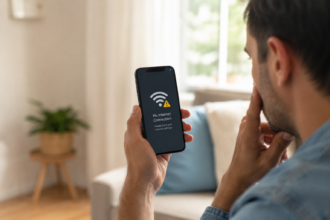
If your phone is going straight to voicemail without ringing, it’s almost always caused by one of a few things: a setting like Do Not Disturb or Airplane Mode, a weak signal, a dead battery, call forwarding being turned on by accident, or the caller being blocked. The good news is that most of these are quick to check and even quicker to fix.
This guide walks you through every likely cause, in order of how common it is, so you can figure out exactly what’s going on with your phone.
Quick Answer
Your phone usually goes straight to voicemail because of a setting on your device, not because it’s broken. Do Not Disturb, Focus modes, Airplane Mode, “Silence Unknown Callers,” and call forwarding are the most common culprits. Poor signal, a dead battery, or an unpaid phone bill can also cause it. Check your settings first, then look at your network and account status if the problem continues.
Why This Happens: The Most Common Causes
Missing calls without even knowing your phone rang can feel unsettling, especially if you’re waiting on something important like a job callback or a message from family. Here are the most likely reasons.
1. Do Not Disturb or Focus Mode Is On
This is the number one cause. Do Not Disturb (or Focus mode on newer iPhones) silences incoming calls and sends them straight to voicemail. It’s easy to turn on by accident, especially if your phone syncs Focus modes with your work calendar or bedtime schedule.
2. Airplane Mode Is Turned On
Airplane Mode cuts off all cellular signal. If it’s on, your phone can’t receive calls at all, and they go directly to voicemail. This one is easy to miss because the phone still looks like it’s working normally for everything except calls and texts.
3. Your Battery Died or the Phone Is Off
If your phone powers off due to low battery, calls will go to voicemail immediately since the network has no way to reach it. This is one of the most overlooked pain points — people assume their phone is on because they charged it earlier, not realizing it shut off hours ago.
4. Weak or No Signal
If you’re in a basement, elevator, rural area, or somewhere with poor coverage, your phone may not be able to receive the call at all. Some phones fail silently here, going to voicemail instead of showing a clear “no service” warning.
5. Call Forwarding Is Turned On
Call forwarding can be switched on by accident, sometimes just by pressing the wrong combination of numbers on the dial pad. When it’s active, every call is redirected — often straight to voicemail — before your phone even has a chance to ring.
6. The Caller Has Been Blocked
If you’ve blocked a specific number, their calls go straight to voicemail without ringing your phone at all. This is one of the most confusing pain points for users, because it’s hard to tell the difference between being blocked and having a technical issue — especially if you didn’t block the number yourself and a family member did.
7. “Silence Unknown Callers” or Similar Settings
Many phones now offer a setting that automatically silences calls from numbers not saved in your contacts. If this is on, unknown callers go straight to voicemail, while people in your contacts list still get through normally.
8. Carrier or Account Issues
An unpaid bill, a suspended line, or a temporary network outage on your carrier’s end can also cause calls to be routed straight to voicemail. This is less common but worth checking if none of the settings above are the problem.
How to Tell If It’s a Setting or a Bigger Problem

If calls from everyone are going to voicemail, it’s likely a phone-wide setting like Do Not Disturb, Airplane Mode, or a dead battery. If it’s only happening with one or two specific people, it’s more likely related to blocking, contact-specific Do Not Disturb rules, or the “Silence Unknown Callers” feature.
Step-by-Step Guide to Fix It
- Check Do Not Disturb or Focus Mode. Go to your phone’s Settings and make sure it’s turned off, or that it allows calls from everyone.
- Check Airplane Mode. Swipe down (or up) to your control center and confirm Airplane Mode is off.
- Restart your phone. This clears small software glitches that can affect call handling.
- Check your signal. Look at the signal bars in the corner of your screen. If it’s weak, try moving to a different location.
- Check for call forwarding. On most phones, this is under Settings > Phone > Call Forwarding. Turn it off if it’s enabled and you didn’t set it up on purpose.
- Confirm the caller isn’t blocked. Check your blocked contacts list in your phone’s settings.
- Check your account status. Log in to your carrier’s app or website to confirm your bill is paid and your line is active.
- Update your software. An outdated operating system can sometimes cause call-related bugs.
Common Problems or Mistakes
- Assuming the phone is broken right away. Most of the time, it’s a setting, not a hardware issue.
- Forgetting that Focus modes sync with calendars. A scheduled event can quietly turn on Do Not Disturb without you noticing.
- Not checking call forwarding after a settings change. Some settings apps or accidental dial-pad presses can turn this on without any clear warning.
- Ignoring low battery warnings. A phone that shuts off unexpectedly is a common reason calls seem to “disappear.”
- Not checking with the caller. Sometimes the issue is on their end, not yours — their phone may be dialing an old or incorrect number.
Helpful Tips
- Turn on “Allow Calls From” exceptions in Do Not Disturb so close contacts can always reach you, even when the setting is active.
- Save important numbers to your contacts so they aren’t filtered out by “Silence Unknown Callers.”
- Check your call forwarding status every few months, especially after updating your phone or switching carriers.
- Keep your phone’s software updated to avoid small bugs that affect call handling.
- If you’re expecting an important call, do a quick settings check beforehand rather than waiting to troubleshoot after you’ve already missed it.
Frequently Asked Questions
1.Why does my phone go straight to voicemail without ringing?
This usually happens because of Do Not Disturb, Airplane Mode, call forwarding, or a dead battery. Check these settings first before assuming it’s a bigger issue.
2.Why is only one person’s calls going to my voicemail?
This is often caused by blocking that specific number, contact-based Do Not Disturb rules, or the “Silence Unknown Callers” setting if their number isn’t saved in your contacts.
3.How do I know if someone blocked me or if it’s a phone issue?
If your calls always go straight to voicemail after one or two rings and you never see a missed call listed, it may mean you’re blocked. If it happens with many different callers, it’s more likely a setting issue.
4.Can low battery cause calls to go to voicemail?
Yes. If your phone shuts off due to low battery, incoming calls have nowhere to go and are sent directly to voicemail.
5.Does call forwarding cause calls to skip straight to voicemail?
Yes, if call forwarding is turned on and set to redirect to voicemail or another number, your phone won’t ring at all.
6.Why do calls go to voicemail even with full signal?
This points to a setting issue rather than a network issue — check Do Not Disturb, Focus mode, and call forwarding first.
7.How do I turn off “straight to voicemail” settings?
Go to your phone’s Settings, check Do Not Disturb, Focus mode, Airplane Mode, and Call Forwarding, and turn off anything that shouldn’t be active.
Final Thoughts
In most cases, your phone going straight to voicemail comes down to a setting you can fix in under a minute — not a broken device. Start with Do Not Disturb, Airplane Mode, and call forwarding, then work your way through the rest of the list if the problem continues. A quick settings check now can save you from missing an important call later.
About the Author
Muhammad Ahmad is an SEO and GEO Specialist and the Founder of Careerzon.org, a platform dedicated to career development and professional growth. He helps readers navigate job searching, resume building, career planning, and skill development through clear, practical, and easy-to-follow guidance. Combining his SEO and GEO expertise with a focus on career content, M. Ahmad ensures Careerzon.org delivers helpful, people-first advice that’s easy to find and easy to understand — whether you’re searching on Google or asking an AI assistant.
Also Read: